|
I have collected together those tips that I could find on how to get the best out of your iPad from our roll call forum on Cruise Critics. I have hyperlinked the tips back to the original posts on the forum. There is a separate page here based on Michelle's post on recommended and useful apps. There is a separate page here on battery life. There is a new page on photos and emails here.
Posted by jgw321 view post
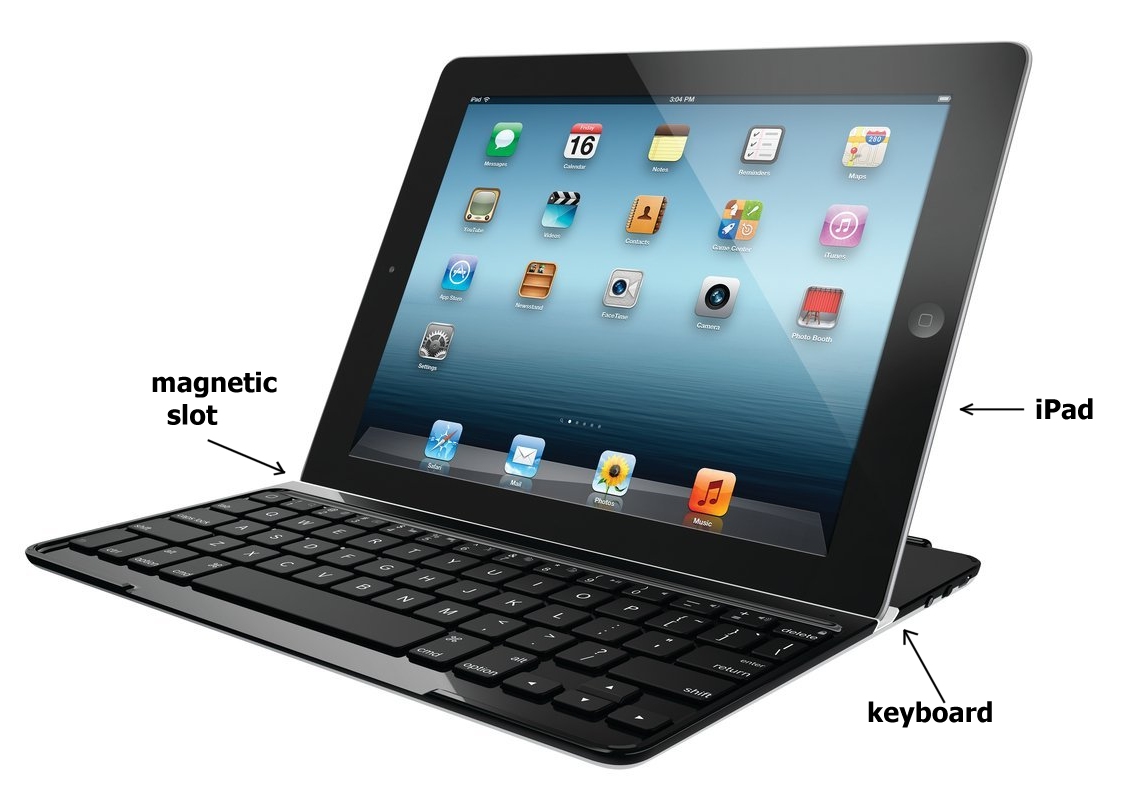
 I bought Carol a keyboard for her iPad. It is early days as she only got it yesterday, but so far she thinks it is going to make things so much easier. It is a superb design as it makes a protective case for the i-pad when not in use, turns the i-pad into a net-book when in use, and is slim enough to fit in the existing padded cover.
We got it from Amazon, look for "Logitech Ultrathin Keyboard Cover for iPad 2 and iPad 3". Although at first it sounds as though it is just a cover it is a keyboard too, working on bluetooth.
JG
I have a bluetooth keyboard for my tablet that I have found makes it so very easy to use for traditional typing. It'll work with the iPad also.
Rich.
(Jacqui and several others had keyboards.)
Posted by jgw321 view post
If you have the Goodreader (itunes store) app it will sync any sort of file to the i-pad and the i-pad can handle spreadsheets as I put my U3A membership one on my ipad. It is also good for note taking as you can annotate pdfs in handwriting using a stylus or your finger.
You can create a pdf from any Windows application using pseudo printer (such as) by just printing it on the pdf printer.
You can write with your finger but a stylus is better
Posted by sapper1
View Post
Tip of the day to conserve battery power. Every day I get rid of open programmes that sap energy. Double click on the home button, the round button at the bottom of your screen (portrait mode, side in landscape mode). This will bring up a row of recently used apps and websites. Press and hold one of them and they will start to wiggle and a - will show on each one. Then touch each - and they will close. Sometimes I have up to 25 open in the background and they do drain the battery -- especially the map because of GPS.
When you are done just touch higher up on the screen and the window will close. This does not have any affect on the four icons that are always at the bottom of the screen. They will stay there.
Posted by Peter view post
You can change the volume of sounds and music with the volume button which is the longest button on the side of the iPad. One end is volume up, the other end is volume down.
There is also a mute switch next to it. If you have this in the wrong position then the volume control seems not to work for some strange reason. jgw321
You can choose whether to use that switch as a mute button or a screen orientation lock. I prefer the lock because I get tired of the screen flipping around when I move the iPad.
It is easy enough to mute by double clicking on the home button and then swiping the bottom display to the right. A mute button will appear along with a brightness and volume slider.
Bobbie
The ringer and other alert sounds are not controlled by the volume comtrol on the side but by a slider under sounds in Settings. However there is an option there to bring them under the control of the external manual volume control.
Posted by gigianne view post
Jacqui wants to do a "Live from the Prinsendam" on CC - to be able to post you have to be logged in and on line. IF she were to use only the iPad how could she compose off line and then copy to the thread. We all know it is do-able using a laptop or net book and copying and pasting but how would she do this from the iPad?
I would just compose in Notes and then copy and paste later. Bobbie
You could start writing an email offline, copy and paste the text by holding your finger down on part of the text, select, expand the boxed selection, copy then go paste online when connected to internet. I don't recall anything like Notepad, (it's called Notes. JG). Apple Pages would do it but you have to buy the program. There are probably other methods... Peter
Posted by kazu view post
Is the kindle app already on the IPAD or do I need to download that?
You have to get a kobo or kindle reader from the App Store. iBooks will come already on the iPad and you can download the spreadsheet to iBooks. In iBooks you can switch back and forth from PDF files to regular book storage. Bobbie
Extra item from me.
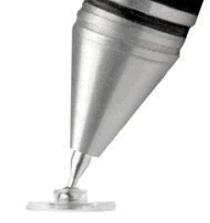 The i-Pad is designed to be used with your finger and,
with the right software, is good for handwritten note taking. Although you can achieve
acceptable results with your finger, I find that a stylus gives better results. There is a
review of different styli here
. Based on that review I bought the Adonit Jot Pro from Amazon at £20.19
and it does a really good job for hand writing. It seems strange that for lines there is a disk
on the end, but that is because of the way the i-Pad works, the stylus is emulating a finger.
The software controls the width of the line drawn. By having the disk transparent and a fine
point on the pen it helps the mind to to cordinate the hand in writing as it looks like a pen or
pencil. It is a bit pricey but if you are going to do a lot of note taking then it is probably
worth the cost.
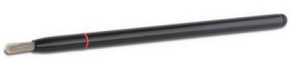 If you want to do painting* on the i-Pad then a brush is probably better than a pen. You can achieve the same effects with a rubber tip but, if used extensivley for shading and painting, it could be subject to excessive wear. I have found the Ekit stylus brush excellent and it is a bit cheaper at £15.47. It has a retractable brush at one end and a rubber tip at the other so you can use it as a brush or a stylus. If you don't do a lot of note taking then the rubber tip will be fine for handwriting and in my experience easier to use (more precise) than your finger. I find that this stylus is far better than the finger for normal i-Pad use, opening closing apps, swiping controls on or off, typing on the in-built virtual keyboard and tapping away in games.
 * If you want inspiration to try painting on the
i-Pad look no further than
David Hockney. At 74 he is not averse to trying new things. Click the thumbnail on the left for full size
image and article from the Huffington post.
If anyone comes up with any further tips or suggestions, or new apps then email me and I'll include them here.
JG.
|