|
Understanding resolution (iii) Let me repeat. You can not see the quality of a picture in your camera, or even on a compter with a large screen, a wall mounted TV is still not big enough. You need to use another device, e.g. a printer. And, unless you use a high quality printer, they all have less resolution than your image. A 4k TV would almost do for a 12 megapixel image; the width would be just right but the height a little short. For any camera above 12 megapixels, the image would need to be reduced to display it, even on a 4k TV. By the 2020s displays might be better, but this is how we are in 2010s. High spec graphic displays costing several thousand pounds, as used in the film industry might do better.
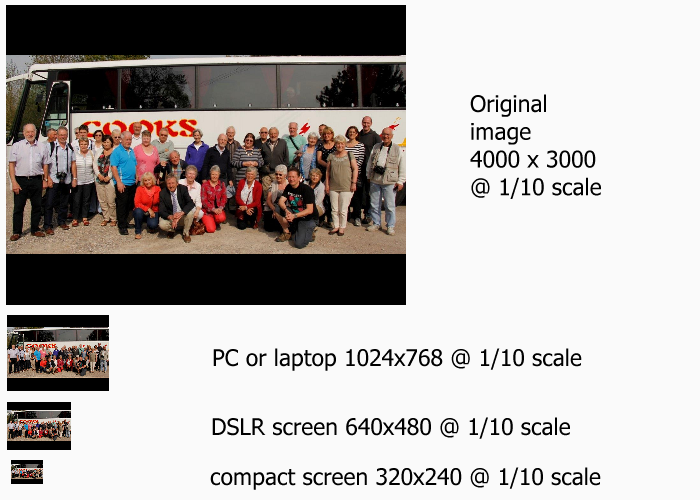
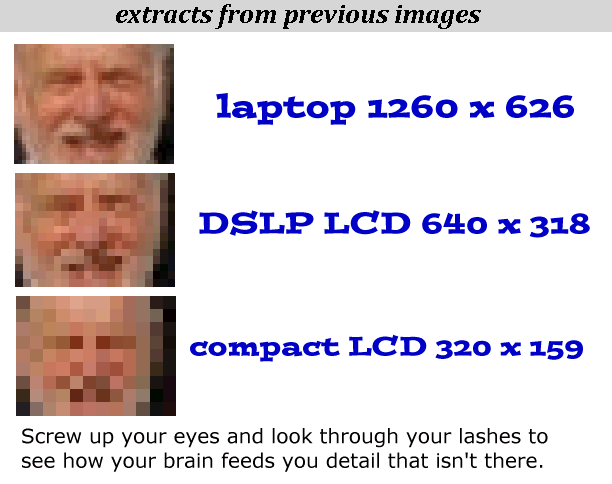
It is hard to visualise them at a tenth, you can see the relative sizes, but it is hard to judge how much detail there would be if they were 10 times larger. So I will omit the actual image (it won't fit on your screen) and show you the others at roughly full size, (click the links). For example; laptop, DSLR LCD and compact LCD. Apart from the fact these get smaller, it all seems to be there, nothing is missing. But wait! You think you can see as much detail in all the pictures, but your brain is misleading you, the lower resolution ones are missing a lot of the detail So don't think what you see on the back of your camera, which looks nice and sharp, is what your image will be like. It is only a guide. Some cameras will let you zoom in to see a small part of the image enlarged which can help. You also don't see your image on a PC/laptop unless you use the same trick. View Actual Pixels to zoom in and then pan around the screen to see the image. |



[ next ]