|
Other modes
There are other things that you can find on the mode dial, which are not
strictly scenes, but more methods of working. Since they determine a
particular way of working, or mode, it is natural to have them on the mode dial.
On some cameras though, they will be in a menu setting, as the amount of space around
the mode dial is limited. I am talking about things like No Flash mode, Movie
Mode, Panorama, HDR, Museum.
Movie Mode
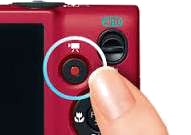 Most cameras
have a special button for taking videos which you can press at any time, but some have
a setting on the mode dial which you have to select and then use the normal shutter
release button. I am not going to say much about videos except that, because the
camera has to take a lot of pictures every second, they are not the full resolution of
the camera, video needs less resolution anyway because the brain integrates
information from one frame to the next. (This was true on older cameras, modern
high spec cameras have faster processors and better sensors and can often do a range
of video resolutions, the higher ones using more memory). Video does take a lot
of your memory card space. For serious video work you might need to use a video
camera, there are significant differences, or buy extra large capacity cards.
Panorama
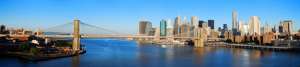 Strictly,
panorama is a technique, not a mode. Since it is normally used with landscapes
it is usually given as an alternative to straight landscape scene mode and will use
the same settings. The technique involves taking several pictures to get a
wider image, but overlapping the images to assist in later stitching of the images
together. A crucial aspect of the process is to have a constant exposure setting
so that individual images will be more easily joined together. If you have
panorama on the mode dial the camera should take care of this for you. If you
have panorama assist as a menu setting then you will need to look after
this. so it is better to wait until we deal with the manual settings. Usually
you get some help in where to do the overlaps, often by showing a ghost of the
previous image in the viewfinder so you can fit the new one over the old. You
can often get good results by doing panoramas in portrait mode. Some cameras
will do the stitching for you and give you a single panorama image. Other
cameras produce the individual images and leave you to stitch them in post
processing. Some cameras let you pan across a scene while you hold the release
button down, and produce a finished panoramic picture for you.
HDR
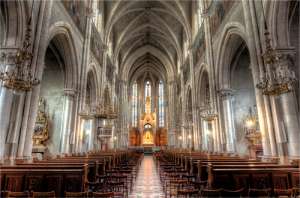 HDR stands
for High Dynamic Range. Cameras can only reproduce a limited range of
brightnesses, from the very brightest highlights to the deepest shadows. This
applies even more to digital cameras than film because of the use of JPEGs. In
average lighting they can cope but sometimes, very bright sun with deep shadows, or
an interior shot with views of the outside through the windows, the camera just can't
cope. A way round this is to take multiple shots with different exposures and
combine them together in software. This is another subject that deserves its
own topic and you can find many tutorials on the web. However many cameras are
now providing an HDR mode where it will do this for you and produce for you a
processed image.
There is a misconception about HDR, partly due to the name. The
final image does not have a high dynamic range, JPEGs only have
8 bit colour depth, computer displays only have 8 bit colour depth and so the final
image has the normal dynamic range. What is done is to work with an image in
the software which has a 16 bit colour depth (or more) and so is a High Dynamic
Range image, but we do not as yet have devices which will display this range, so a
technique called tone mapping is used to fit this image into an 8 bit colour depth in
such a way that the maximum number of colours are used. Similar effects can be
achieved with NIK colour effects on a standard 8 bit image. If you have a 4K
TV, in theory you could get better colour depth by displaying on it, but much would
depend on the software used to get a 16 or more bit colour depth image from
the editing software to the TV. If JPEG is involved then you will be back to
an 8 bit colour depth.
No Flash mode
This is another case where you might find this on your mode dial or it might
be buried in the menus. This is an area where I do my own snearing.
Earlier I belittled those that snear at people using AUTO. I snear at those who
don't know how to turn their flash off. I am sure you have all seen stadiums
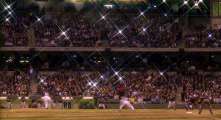 with crowds
watching athletics or a football match and when ever something significant happens,
flashes pop all over the stadium. Now an internal flash illuminates things within
a few feet, ten if your lucky. Even a powerful external flash will only go a few
yards at best. The action is several hundred yards away, firing that flash will
do nothing. Correction, yes it does have an effect, it runs the battery down
faster. If you go to a night time shot, such as the Aurora Borealis and leave your
flash under the whim of the camera, things could be worse, you might end up with a black
eye or bloody nose! (The Aurora is 60 miles away, what difference will your puny
flash make? Apart from ruining everyone elses dark adaption.) You do need to learn
how to turn your flash off. Unfortunately it is not easy to find on some cameras.
Having it on the dial is easy, but then it limits you to auto mode, you can't select
another scene mode and no flash at the same time. Some cameras have a flash sub menu
which makes it easier to combine with other settings. There are three ways of working:-
- Having flash permanently off and turning it on when you need it
- Leaving flash on, but turning it off when it is not wanted
Which of these you prefer is a matter of personal choice, just don't be a
dummy and choose the third option of not knowing how to work the flash. There are
times when you will want to avoid your flash firing. Taking shots through a coach
window and in churches and museums where flash photography is not allowed.
Museum mode
Sometimes this is coupled with the no flash mode, sometimes it is a separate
setting but the idea is the same. Let the camera do its thing, but quietly so as
not to annoy others. I find it exasperating on a long coach or airplane journey,
when I am trying to sleep, to have a constant beep -- beep -- beep from a nearby seat
as someone reviews their pictures. They can see the picture change with their
eyes, they do not need audio feedback to tell them the picture has changed.
Likewise, in a church it is not really necessary for the camera to play a
"shhhherklunck" sound effect just to tell you the picture has been taken, you can see
it on the display at the back.
|
