|
 This article will be about the email side of things, but I will say something first about
internet on board. I do have an article on shipboard
internet which also has a link to a Cruise Critic article. Ship board internet is
constantly evolving and there are differences between different lines. Social media
and email only make modest demands on the bandwidth, as there is a lot of idle time between
page requests while the user reads the contents. An exception is if you share large
numbers of large photos straight out of the camera, these should be resized to fit the
display screen before uploading. If you don't understand why this is, have a read of
this article. A typical 4000x3000
image can reduce from 2728KB to 250kb which uploads in 1/10th of the time. The real
bandwidth hogger is video, two or three people streaming HD films can slow everything to a
crawl. Different lines tackle this problem in different ways; some throttle the
streamers when they make huge bandwidth demands, others block streaming altogether, others
offer a two tier service with the high bandwidth one for streaming being more
expensive. If there is not sufficient information in your cabin about their internet
service, then seek further assistance from the Internet consultant or reception. If
you only want email, don't over pay to get the fast service, the streamers will be
hogging it; you'll getter better response times on the slow service.
 The internet used to be very easy
to use, provided you had a browser and knew of a search engine, then you could get
anywhere you wanted. Because many people have poor moral standards it is
neccessary to take some basic security precautions, like passwords, but it was
manageable. You used to be able to just connect to your email provider and read
your emails. Nowadays the nanny state is interfering and legislation keeps
arriving under the guise of defeating terrorism and paedophiles, which does little to
stop them, but hampers ordinary individuals. Google has unilaterally decided that
any site that is not using SSL (Secure Sockets Layers) is unsafe, they may even block
them from search results one day. SSL sites use HTTPS rather than HTTP, this is only
needed for sites that collect sensitive data, such as personal information or
credit card numbers. If a site does not collect ANY information, and all its
pages are accessible to the public anyway, it does not need any security and using HTTP
is not a security concern. But you can't argue against the government and Google,
they know what is best for us. We must do what we are told.
 What has all this got to do with
acessing my emails on a cruise? Well if you have recently opted for two
factor authentication, or even if not, the Nanny state attitude of service providers
can be a big problem. In the past, if you knew your password you were in, but now
email providers track which device you use and which IP address you sign in from.
Check your email from home on your PC everyday, and you will have no problem, but sign in
from an Android phone via the ships connection and you could be challenged to prove
who you are. The fact that you know the 20 character, random string that is your
password doesn't count. They will want to verify you with the two factor
authorisation. There may be several options and you need to chose something that
will work not just at home, but anywhere. You will not be able to get a pin from
your landline phone if you are at sea, or from your mobile if you have no signal or have
forgotten to bring it, or from a second email account if only your password manager at home
can remember the password. It seems like a good idea when you are asked to set it up,
but choose your options carefully.
 Some problems I have had. I
initially used an SMS message on my phone. After 10 minutes nothing had arrived
so I clicked re-send. Still nothing so I clicked resend again. Still nothing,
while I was scratching my head my phone buzzed and a message arrived, but the email server
wouldn't accept the pin, it said the security code was wrong. I tried another, as by
now I had several, but we were now out of sync and they decided to lock me out.
Recovery after a lockout is even harder than two factor authentication, so you want to
avoid it if you can. I got back to my account by sending a code to my wife's
email account. SMS messages can take 15 to 20 minutes to get through, so be
patient and don't be tempted to click [resend]. I then used the authenticator
app on my phone which was much better, there are no 6 digit pin numbers to enter, with
the risk of mistyping or getting out of sync. The app pops up when it gets the signal
and you just have to tap a button. This is probably the best option for a cruise
providing you have your phone with you and it can get a signal.
 There is another option which in
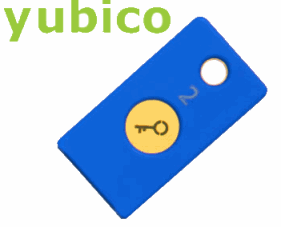
theory should solve all problems, but in practice might not. You can get a USB
connection security key from yubico.com (there
may be others, FIDO2 and U2F are keywords for search). This key plugs into
whatever device you are using to prove it is you. You can keep it on your key
ring.
Amazon sell these, they have various sorts. A snag might be that you can't plug
a USB device into your phone, though an OTG adaptor might solve this. Another snag
might be you are accessing your email from a ship's terminal and there is no USB socket
provided, (some ships consider it a security risk as USBs can be infected with
viruses). Another snag might be that it only works on your computer and fails when
you try it on another. This happened to me, set up on one PC and failed to work on
my second PC. I have not resolved what the problem was, I just turned two factor
authorisation off. If you use a strong password and are careful with it, you
don't need two factor authorisation.
|